Collaborate in real time for more effective rehearsals

Collaborating on a score is now easy: share your annotations and comments in real time, work together on multiple projects, stay in sync with other musicians, and save your work to the Newzik Cloud.
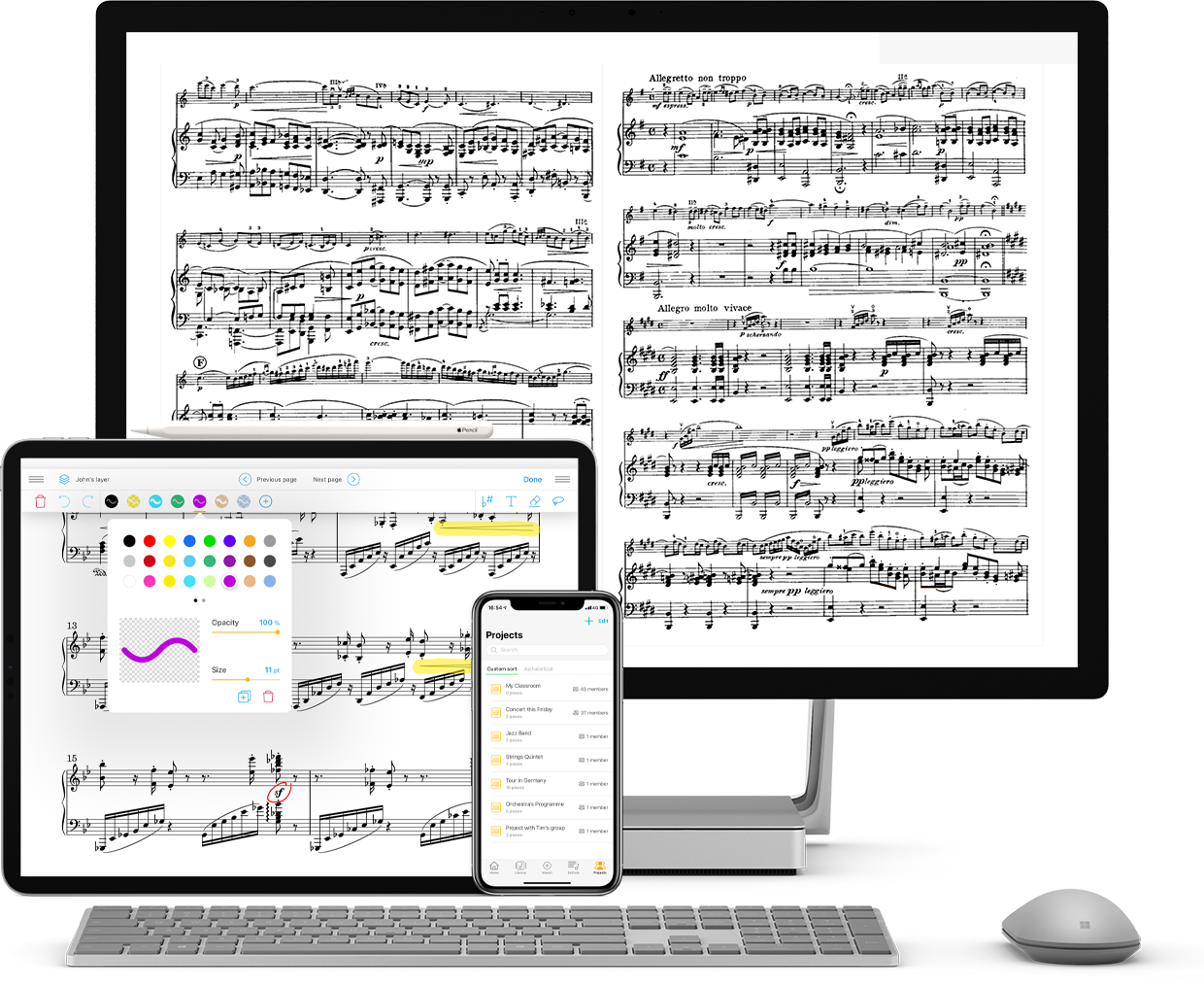
A computer screen, a tablet, and a smartphone displaying sheet music. The computer screen shows a complete sheet of music, the tablet displays a sheet of music with colored annotations, and the smartphone shows a list of named projects.
Five orange stars lined up against a transparent background.
4.7 on the Apple Store
500,000 users
Over 150 institutions trust us (opera houses, ensembles, schools)
14 million scores managed

Organizing a concert with other musicians: Is it always such a struggle?

The sheet music for the next rehearsal is somewhere on the computer. Which folder was it again? The latest revision came through WhatsApp. Which version is the right one now? And the concert setlist still needs to be put together.

📂

PDFs scattered all over the place

Between the computer, the phone, and the USB drive, finding the right partition can sometimes feel like a miracle.

🔀

Multiple versions, total confusion

Corrections via email, WhatsApp, Dropbox… It’s impossible to know which one is the right one when it’s time to play.

🖨️

We're reprinting (again)

Since we can't find the file, we have to start the print job over. It's expensive, pointless, and frustrating.

📋

The setlist, which has to be rewritten every time

No memory, no template—we start from scratch before every concert or rehearsal.

🗂️

No suitable facilities

Generic folders don't fit with musical logic. Everyone cobbles together their own system.

⏱️

Time Stolen from Music

Every minute spent searching is one minute less for playing, practicing, and improving.

Create a project on Newzik and share it in real time with other musicians

You no longer have to worry about finding the right PDF in the right WhatsApp conversation. Thanks to projects on Newzik, you can keep everything in one place: setlists for your next concert, annotations, and comments that update in real time. All you have to do is play—with peace of mind!

Project Management

Create a dedicated workspace for yourself and other musicians, and make the sheet music and setlists for your concert available to everyone.  

Layer System

Switch between private and public layers. Show only your own annotations or those of all project members to avoid confusion.

Synchronized annotations

Add comments, highlight sections, and add fingering, markings, bowing, and changes to your project. These updates automatically sync with all other members of your project.

Cloud Backup

All your annotations, setlists, and sheet music are automatically saved to the Newzik Cloud and available to all project members. No more problems with outdated versions!

Cross-platform

With Newzik Cloud, you can access your project anywhere: on your computer, iPad, or iPhone. No more worrying about forgetting your sheet music for a concert!
A young man, seen from behind, is playing the piano while reading a sheet of music displayed on a tablet resting on the piano keyboard.
THEY TRUST US

What Our Users Say

A row of five orange stars, symbolizing a perfect score or a high rating.

The way Newzik stores data and makes sharing and collaboration easy is fantastic, whether you're using it on your own across multiple platforms (PC, Mac, tablets, phones) or with others (sheet music, annotations, etc.).

aoeui555

April 12, 2023
A row of five orange stars, symbolizing a perfect score or a high rating.

For me, the biggest advantage is cloud synchronization. This means all your sheet music is stored off-site and accessible from all your devices, including your annotations. A simple “Performance Mode” button prevents tool menus from opening accidentally while you’re playing music. This feature can be quickly turned off. I would definitely recommend this app to musicians of all skill levels.

rgbowden

February 20, 2019
A row of five orange stars, symbolizing a perfect score or a high rating.

An app I use for all my gigs that perfectly meets my needs, both for displaying scores and taking notes. The sharing and syncing features are perfect for group work. This app is a must-have for me!

Damien Blanchot

June 25, 2024
Frequently Asked Questions

Frequently Asked Questions

How can I share my sheet music with other musicians?

When you create a project on Newzik, you can invite other musicians to access your project. Within the project, import your sheet music and concert setlists so that everyone can access them.

If I add notes to my sheet music, can everyone see them?

No. You can add your annotations to a layer. The layer can be private or public. If your annotations are associated with a private layer, only you can see them.

Is the sharing of annotations done in real time?

Yes. The scores for a given project are synchronized in real time. Any changes you make in your workspace will be visible to the other project members. Save time during rehearsals and while preparing for a performance!

Do I automatically see all the musicians' annotations?

No. You can choose which layers to display.

I work in an ensemble or orchestra—does Newzik also work for larger-scale projects?

Yes, Newzik offers a special plan for organizations (orchestras and ensembles). In addition to collaboration features, you’ll have dedicated access to manage all aspects of your projects—from managing and distributing sheet music to storing and managing members. Visit our Ensembles and Orchestras page for more information.

Is there a free version?

You can try Newzik for free. Visit the pricing page to learn the exact terms of the free offer.