
No more overflowing folders and scattered PDFs. With Newzik, your entire music library is organized, searchable, and accessible on every device.
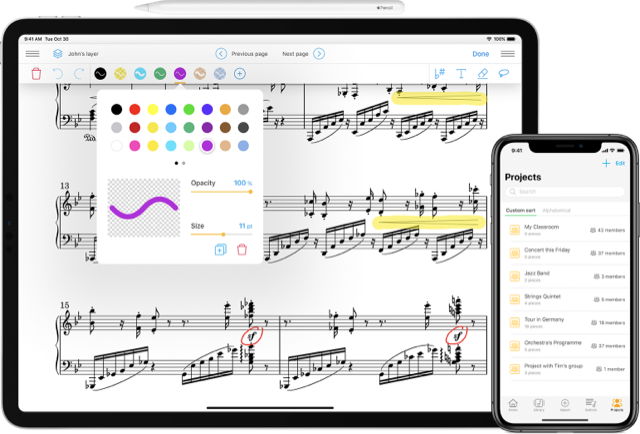
Upload a PDF, have it automatically organized, find it in a flash, and create your setlist—all in less than 2 minutes.
The sheet music for the next rehearsal is somewhere on the computer—which folder was it again? The latest revision came through WhatsApp. Which version is the right one now? And the concert setlist still needs to be put together.
Between the computer, the phone, and the USB drive, finding the right partition can sometimes feel like a miracle.
Corrections via email, WhatsApp, Dropbox… It’s impossible to know which one is the right one when it’s time to play.
Since we can't find the file, we have to start the print job over. It's expensive, pointless, and frustrating.
No memory, no template—we start from scratch before every concert or rehearsal.
Generic folders don't fit with musical logic. Everyone cobbles together their own system.
Every minute spent searching is one minute less for playing, practicing, and improving.
We're not fighting paper—we're making sure you always know where your sheet music is.
Three steps to go from a mess of files to a perfectly organized music library.
Upload your PDFs or take photos of your printed sheet music directly with your smartphone. Newzik takes care of everything—in just a few seconds.
Organize your pieces by instrument, genre, or your own tags. The search feature finds any sheet music instantly, even among hundreds of pieces.
Put together your setlist for rehearsal or a concert in just a few clicks. Everything you need is right here—on your tablet, smartphone, or computer.
A choir director who brings all the voices together and directs them from a single location.
A musician who carries his entire library on his iPad to concerts.
A teacher who organizes each student's repertoire separately.
A band that puts together its setlist for each concert in just a few minutes.
Whether you teach, compose, or play for fun—your time belongs to music, not to searching for the right sheet music.

"I lead a 40-person choir. Before Newzik, distributing sheet music was a logistical nightmare. Now, everyone has the right version in real time."
"I have several hundred pieces in my library. Newzik's search feature finds any sheet music in two seconds. I can't imagine being without it anymore."
"I lead a 40-person choir. Before Newzik, distributing sheet music was a logistical nightmare. Now, everyone has the right version in real time."



.png)