
Which sheet music app is best for beginners?

Table of Contents
What criteria should you use when choosing as a beginner?
Beginners should prioritize three features: ease of use, the ability to import PDFs, and audio guidance for practicing on their own. A sheet music app is only useful if it reduces the time between when you open your tablet and when you start playing. Newzik puts this quick start at the heart of its app, which is available on iPad and via a web browser.
The first criterion is still usability. A first-year student doesn't need a complex interface. They need to open a score, turn the pages without putting down their instrument, and write a note. Newzik lets you turn pages with a Bluetooth foot pedal and make annotations with your finger or a stylus.
The second criterion is import. Beginners often obtain their sheet music in PDF format, either sent by their teacher or downloaded from free platforms such as IMSLP, the International Music Library, which hosts more than 700,000 public-domain sheet music scores. Newzik imports these PDFs and organizes them into a sheet music library that can be accessed from anywhere.
The third criterion is listening. Hearing the piece you’re supposed to play helps you correct your rhythm and pitch. Newzik’s music AI reads the sheet music aloud to accompany you. To help you understand music theory at the same time, the Newzik blog explains how music theory is actually used.
4.7/5
Newzik rating on the App Store (App Store, 2026), based on 450,000 users
Is there a free sheet music app for beginners?
Yes, Newzik offers a free version that lets you import, view, and annotate sheet music without a subscription, which is more than enough to get started. Newzik’s freemium model allows beginners to try out the service before committing to a payment. You create an account, import your first PDFs, and get started—no credit card required.
This initial free access is a game-changer for conservatory students and self-taught musicians. Many give up on digital sheet music because they’re worried about the cost. With Newzik, the sheet music library and annotation features remain available for free. Advanced features such as LiveScores, instant transposition, and ensemble synchronization are available through paid subscriptions.
MuseScore also offers free access, but its core focus remains music notation editing—a use case that’s far removed from what a beginner who simply wants to read and play music is looking for. To put the two approaches in context, Newzik details the differences in its Newzik vs. MuseScore comparison.
Switching to a subscription is a good idea once a beginner starts making progress. Transposition allows you to adapt a piece to your voice or to the instrument you’re playing. This feature is missing from forScore, Newzik’s direct competitor. For more information, the blog explains how to transpose a score without making mistakes.
Key takeaways
- Newzik offers a free version that includes importing, viewing, and annotating
- The freemium model has 450,000 users and 14 million sheet music files under management
- Instant conversion—which isn't available on forScore—comes with a subscription
Comparison of Sheet Music Apps for Beginners
Among music sheet apps, Newzik stands out for beginners thanks to its free version, audio playback, and built-in transposition feature. The table below compares Newzik to two industry leaders based on the criteria that matter most when you're just starting out: cost, ease of use, and learning features.
Free version
- Newzik: Yes
- forScore: No (one-time purchase)
- MuseScore: Yes
Import PDF
- Newzik: Yes
- forScore: Yes
- MuseScore: Partial
Audio Reading
- Newzik: Yes (Music AI)
- forScore: No
- MuseScore: Yes
Instantaneous transposition
- Newzik: Yes
- forScore: No
- MuseScore: Yes
Platform
- Newzik: iPad + Web
- forScore: iPad
- MuseScore: iOS, web, desktop
For a beginner, the combination of a free version and audio playback makes Newzik the better choice. MuseScore remains a good option for those who want to learn how to write music, but its editing interface is more than a student needs if their primary goal is to read music. forScore is aimed at users who already own an iPad and are willing to pay a one-time fee. Newzik offers a comprehensive alternative to forScore for comparing the two apps’ features.

What features are really helpful for a beginner?
The most useful features for a beginner are free annotation, audio playback of the sheet music, and transposition, as they help you understand the piece more quickly. A sheet music app goes beyond simply displaying sheet music when it helps you practice. Newzik integrates these three tools into an interface designed not to overwhelm the user.
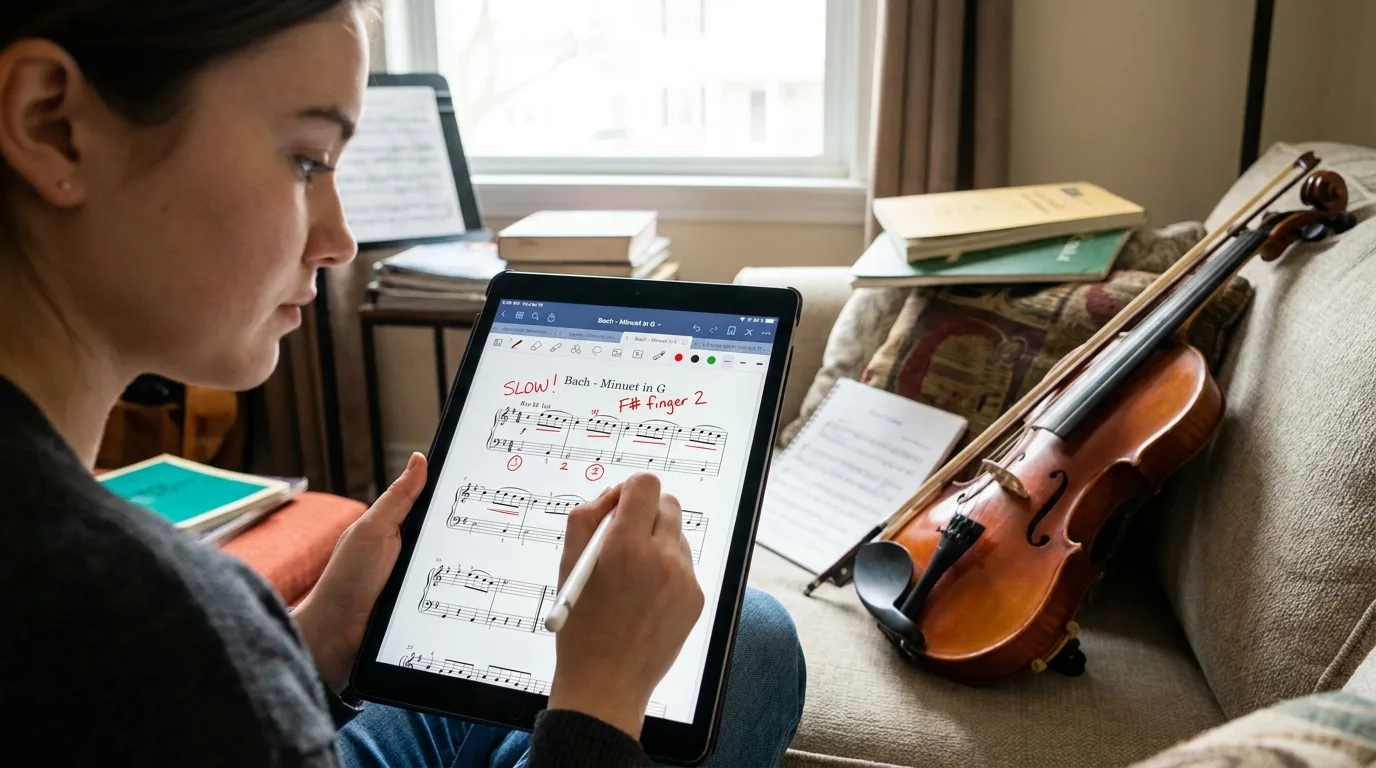
Annotation comes first. A beginner should write down a fingering, circle a difficult measure, or mark a breath. Newzik lets you write using the Apple Pencil or your finger, with colors and shapes. The guide to annotating sheet music on the iPad shows the basic gestures.
Audio Reading
Newzik's music AI plays the score to correct the rhythm and pitch
Transposition
Raise or lower the pitch of a song with a single gesture—ideal for transposing instruments
Live Scores
OMR technology converts a PDF into an interactive score that can be followed measure by measure
Audio playback is especially helpful for developing a sense of rhythm. A beginner guitarist learning their first songs benefits from hearing the melody before playing. The Newzik blog lists guitar songs for beginners that are well-suited for this practice. LiveScores takes it a step further by converting a PDF into an interactive sheet music file using optical music recognition (OMR).
Do I need an iPad, or is the web app enough?
A beginner can start with the Newzik web app on a computer, but the iPad is still the most convenient device for reading and turning pages at a desk. Newzik is available on iOS—primarily on the iPad—and via a web browser. There is currently no Android version.
The iPad offers a reading experience similar to that of a paper score. When held vertically, the screen displays an entire page, and the Bluetooth pedal turns the page without requiring you to put down your instrument. This is the format chosen by most of Newzik’s 450,000 users and by more than 150 partner institutions, including opera houses and conservatories.
The web app complements this functionality. It allows you to organize your sheet music library on a large screen, prepare your sets, and import PDFs from a computer. This way, beginners without a tablet can try Newzik for free before making a purchase. To organize your collection from the start, the guide to digitally organizing sheet music provides a step-by-step method.
The choice therefore depends on the context. For playing in class or at a concert, the iPad is the obvious choice. For organizing and preparing, a computer is sufficient. Newzik syncs the two, so that a score annotated on a tablet is also available online.
How do you import and annotate your first sheet music?
Importing a sheet music file into Newzik takes less than a minute: you upload a PDF, it’s added to your library, and then you annotate it with a stylus or your finger. The process is the same on both the iPad and the web app, which is reassuring for beginners who aren’t very tech-savvy.
- Open Newzik and tap the "Import Score" button.
- Select a PDF from your device, a cloud service, or an email from your teacher.
- The sheet music is added to your library, organized by title, composer, or instrument.
- Open it and use the annotation tools to note fingerings, breaths, or dynamics.
- Turn on audio playback or transposition to practice the piece.
Annotating is the action that beginners repeat most often. Newzik saves every mark and syncs it across devices. For scanned sheet music, the import feature also handles the images. The Newzik blog shows how to work with lyrics, chords, and annotations using Newzik.
A practical tip: Start with two or three pieces—no more. An overloaded sheet music library can be discouraging. Newzik can handle up to 14 million sheet music files in total, but beginners make better progress with a small, well-annotated repertoire.
What Our Customers Say
Newzik has an average rating of 5.0 out of 5 based on 5 verified reviews left by professional musicians and teachers who use the app on a daily basis.
"An excellent app for sheet music. I'm a professional musician and teacher, and I use it every day. It runs smoothly and offers plenty of options for annotations. And for my lessons, I have my entire library right in my pocket (or almost). I highly recommend it!"
— Franck Paque
★★★★★ 5/5
"PROFESSIONAL! An app that never crashes and does everything you need to work like a pro. Perfect in every way, from music education to live performance. Well done, and thank you to the developers at the Newzik team!"
— Gilles Wilhelm
★★★★★ 5/5
"My go-to sheet music app for years! As a professional musician, I’m very satisfied with Newzik’s user-friendliness, features, and stability. As an early adopter, I’ve seen it evolve (always for the better!) and I highly recommend it to all musicians—both professional and amateur—who are looking for the best solution for reading sheet music on a tablet."
— Ez
★★★★★ 5/5
"As a daily user of the French app NEWZIK for reading and annotating sheet music, I highly recommend it: whether for orchestras, chamber music, or educational settings… the app is updated very regularly and always for the better! Long live NEWZIK!"
— David NICOLAS
★★★★★ 5/5
Frequently Asked Questions
Is Newzik free for beginners?
Yes, Newzik offers a free version that lets you import, view, and annotate sheet music without a subscription. Advanced features such as LiveScores and instant transposition are available only with paid plans.
Can you use Newzik without an iPad?
Yes, Newzik also works through a web browser on a computer. A beginner can try out the app for free without a tablet, although the iPad is still the most comfortable option at the desk.
Is Newzik available on Android?
No, Newzik is available on iOS (primarily on the iPad) and via a web browser. There is currently no Android version.
What's the difference between Newzik and forScore for beginners?
Newzik offers a free version, audio playback, and instant transposition—a feature not available in forScore. forScore is a one-time purchase and is aimed at iPad users who already own the device.
Can you import PDFs into Newzik?
Yes, importing PDFs is a core feature of Newzik. The sheet music is added to your library, organized by title, composer, or instrument, and you can still annotate it with a stylus or your finger.
Can Newzik step in to help me?
Yes, Newzik's music AI reads the sheet music aloud to help you play along. This feature helps beginners improve their rhythm and memorize the melody before playing.
How many users trust Newzik?
Newzik has 450,000 users, 14 million sheet music scores in its database, and more than 150 partner institutions, including opera houses, orchestras, and conservatories. The app has a rating of 4.7 out of 5 on the App Store.
All resources
Ready to get started with the right music notation app?









.png)
.jpg)
.png)


.png)
Subscribe to our newsletter