
What is the most comprehensive music notation app for professionals?

Table of Contents
Reading time: 7 min
What criteria define a professional sheet music app?
A professional sheet music app must offer at least four key features: high-resolution PDF display, precise annotation tools, the ability to manage a large library, and reliability in live performance settings. Amateur musicians may be satisfied with a simple PDF reader. Professionals, on the other hand, work with hundreds of scores, perform under varying lighting conditions, make annotations during rehearsals, and share their files with other musicians.
According to a survey published by the CNRS-IReMus (Institute for Musicological Research), more than 70% of orchestra musicians surveyed in 2024 use a tablet to read their sheet music during rehearsals. The shift to digital technology is accelerating, but not all tools meet the demands of the field.
The criteria to be evaluated first:
- PDF display quality (resolution, zoom, on-screen contrast)
- Annotation tools (stylus, pencil, text, shapes, colors)
- Library management (tags, setlists, quick sorting)
- Page turning (Bluetooth, foot pedal, automatic)
- Syncing and sharing with other musicians
- Application stability during live performances
- Offline availability
According to feedback from its professional users, Newzik meets all of these criteria. The app also incorporates artificial intelligence features for transposing and managing sheet music, which sets it apart from purely passive solutions. For a detailed analysis of sheet music reading tools, check out our guide to the best app for reading and managing sheet music.
70%
of orchestra musicians use a tablet during rehearsals (CNRS-IReMus, 2024)
Comparison of the Top Sheet Music Apps in 2026
In 2026, four sheet music apps dominate the professional market: Newzik, forScore, MobileSheets, and Flat. Newzik is the only solution that combines real-time ensemble synchronization and AI-powered transposition in a single interface available on iOS, Android, and web browsers.
forScore, available exclusively on iOS since 2010, remains popular among classical musicians who use iPads. MobileSheets is primarily aimed at Android users. Flat focuses more on editing and composition than on reading music during performances.

This comparison shows that Newzik is the only app that meets the needs of live performances, ensemble rehearsals, and teaching all at once. To learn more about how Newzik compares to forScore, read our detailed analysis of the best alternatives to forScore. To compare Newzik and MobileSheets point by point, visit the Newzik vs. MobileSheets page.
Why is Newzik the most comprehensive sheet music app?
Newzik brings together in a single app the features that professional musicians use every day: high-fidelity PDF playback, multi-layer annotations, advanced library management, ensemble synchronization, and AI tools. The app was developed in France and has been available on iOS, Android, and web browsers since 2014.
Annotations in Newzik work in overlapping layers: each musician can keep their own marks without erasing those of another user. This structure is particularly useful in orchestras and ensembles where multiple musicians are working on the same score.
High-resolution playback
Optimized display for 12-inch tablets, full-page zoom, dark mode for the stage
Multilayer annotations
Pencil, Apple Pencil, text, shapes, colors, selective sharing by layer
Synchronization Together
Synchronized page-turning for all sections of an orchestra in real time
Artificial Intelligence
Automatic transposition, recognition of handwritten sheet music, import from photos
The Newzik Ensemble feature allows a conductor or music director to control page turns for all musicians simultaneously. This capability is not available in forScore or MobileSheets. The Newzik AI app also includes tools for intelligent score processing, including transposition in just a few seconds.
App stability is a point frequently mentioned by users: Newzik doesn’t crash during live performances, which is an absolute must for professionals. As professional musician Gilles Wilhelm writes: “An app that doesn’t crash, that can do everything we need to work professionally.”
How does score annotation work on a tablet?
Annotating sheet music on a tablet involves writing, drawing, or adding symbols directly to the PDF file of the sheet music using a stylus or your finger, without altering the original file. The best apps store these annotations in a separate layer, thereby preserving the source file.
In Newzik, the annotation tool works with the Apple Pencil (1st and 2nd generation) on iPad, as well as with Samsung styluses on Android. According to several professional musicians who have been testing the app since its initial release, the level of precision achieved is comparable to writing on paper.

The types of annotations available in Newzik include:
- Freehand pen (variable pressure sensitivity)
- Highlighting in different colors (yellow, orange, blue, green)
- Inserting text (fingerings, dynamics, tempo markings)
- Geometric shapes (circles, rectangles to mark pathways)
- Selective erasure by layer
- Predefined musical symbols
Page turning is triggered using a compatible Bluetooth pedal (AirTurn, PageFlip, etc.) or by swiping. Newzik also supports automatic page turning based on a preset tempo, which is useful for soloists who play from memory and need visual cues.
Franck Paque, a professional musician and teacher, describes this fluidity as follows: "Great fluidity, with plenty of options for annotations. And for my classes, I have my entire library in my pocket (or almost)."
Key takeaways
- Newzik annotations are stored on separate layers of the original PDF
- Compatible with Apple Pencil (1st and 2nd generation) and Samsung Galaxy Tab styluses
- Page turning is controlled via a Bluetooth pedal or touch swipe
- Annotations can be shared or hidden for specific users within a group
Which sheet music app should you choose for an orchestra or ensemble?
For an orchestra or musical ensemble, a sheet music app must manage page-turning synchronization among all musicians, the distribution of scores by section, and shared annotations. In 2026, Newzik is the only app to combine these three features.
The Newzik Ensemble feature, available in professional plans, allows a choir director or orchestra conductor to:
- Create a shared session for all members
- Distribute the sheet music by section (first violins, second violins, violas, etc.)
- Synchronize page turns in real time on all musicians' tablets
- Send notes to the section leader (rehearsal pianist)
- Manage access rights by member
This organization caters to the needs of both amateur and professional orchestras. David NICOLAS, a daily user, notes in his review: "Orchestras, chamber music, educational settings… the app is updated very regularly and always for the better."
Synchronization works over a local Wi-Fi network during concerts and rehearsals, without requiring an internet connection. This is a crucial technical feature for orchestras performing in venues without a reliable network.
Only oneapp-
s to offer comprehensive real-time synchronization across iOS and Android in 2026: Newzik
Which sheet music app should I use for music education?
For music education, a sheet music app should allow teachers to easily share excerpts, make real-time annotations during lessons, and manage a library organized by student or by repertoire. Newzik offers a module dedicated to music education that meets these specific needs.
The Newzik Education page details features specifically designed for conservatories, music schools, and private lessons. Teachers can create classes, assign sheet music to their students, and review the annotations made between lessons.

The benefits of Newzik for music education:
- Library accessible on all tablets in the classroom
- Instant sharing of sheet music between teachers and students
- The teacher's annotations appear as an overlay on the student's sheet music
- History of annotations by class session
- Compatible with major digital sheet music platforms
Franck Paque, a professional musician and teacher, uses Newzik "every day" and notes that having "my entire library in my pocket" allows him to be ready to teach in any educational setting. The app’s stability, confirmed by numerous users over the past five years, is a guarantee of reliability for teachers who can’t afford any glitches during class.
For musicians who also want to transpose sheet music directly within the app, the guide on how to transpose sheet music using an app details the practical steps available in Newzik.
How much does a professional sheet music app cost?
The price of a professional sheet music app ranges from €0 to €20 per month, depending on the features selected. Newzik offers a starter plan starting at €4.99/month, with plans tailored for ensembles and music institutions.
Pricing models vary depending on the application:
- One-time purchase: forScore (~$19.99 one-time fee on iOS), MobileSheets (~$9.99 on Android)
- Monthly subscription: Newzik (starting at €4.99/month), Flat (starting at €4.99/month)
- Institutional Offers: Newzik offers per-section pricing for orchestras and music conservatories
Newzik's subscription model includes regular updates and new features. The Newzik team, described by users as "young, dynamic, and very responsive when issues arise" (Danimperator Dan), releases regular updates that enhance the app at no extra cost.
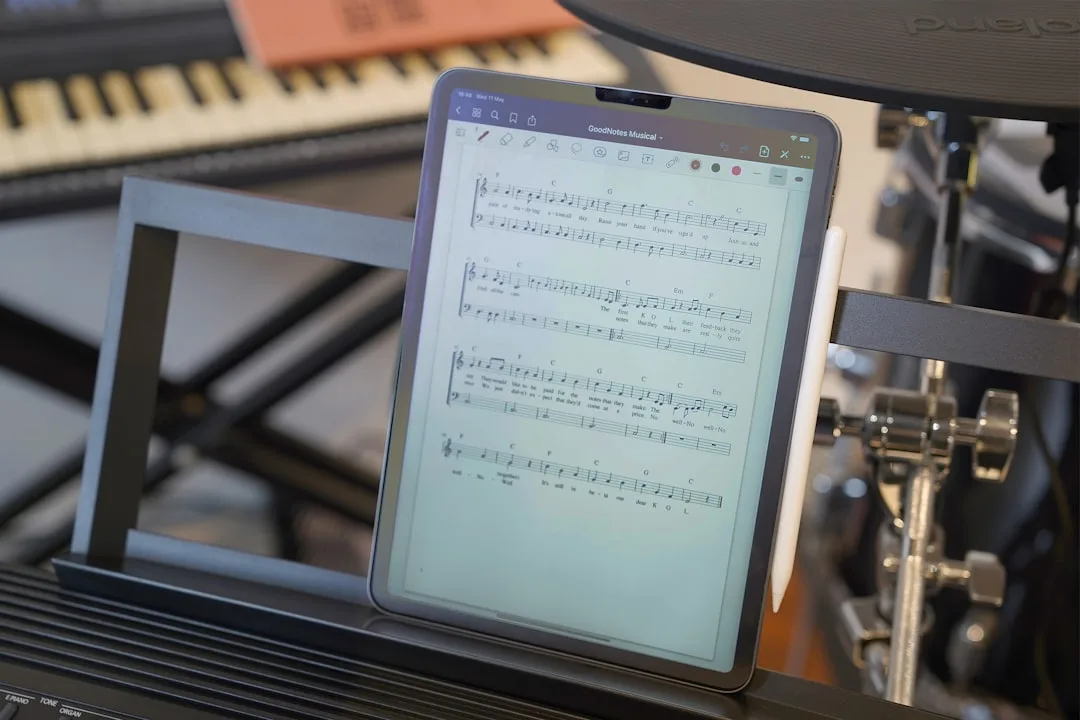
For amateur or semi-professional orchestras, the cost of equipping musicians with tablets and Newzik subscriptions remains lower than the cost of purchasing and transporting paper sheet music over an entire season. A study conducted by France Musique (2024) on the digital transition of amateur orchestras indicates an estimated average savings of €300 per musician per year on printing and photocopying costs.
Newzik Solo
Starting at €4.99/month. Reading, annotations, unlimited library, basic AI.
Newzik Ensemble
Price per music stand. Real-time synchronization, sheet music distribution, rights management.
Newzik Education
Institutional pricing for conservatories and music schools. Classes, student tracking, shared library.
What professional musicians say
Newzik has an average rating of 5 out of 5 based on 5 verified reviews from professional musicians. Here is their feedback, gathered from users who have been using the app daily for several years.
"I've been a Newzik user and tester since the very beginning. I've had the pleasure and joy of watching this app evolve and reach levels of perfection I never thought possible. I use it EVERY DAY. The Newzik team is young, dynamic, and very responsive when issues arise. I can only encourage you to give it a try... and you'll love it. I play in a pop band (on guitar with hundreds of sheet music files and backing tracks...) I also perform solo using an Akai Ewi 5000 wind controller + Xpresso expander in classical, pop, folk, and jazz genres...) I am sincerely grateful to Newzik for creating and putting this extraordinary app in my hands."
Danimperator Dan, professional musician (variety orchestra, soloist)
★★★★★ 5/5
"An excellent app for sheet music. I'm a professional musician and teacher, and I use it every day. It runs smoothly and offers plenty of options for annotations. And for my lessons, I have my entire library right in my pocket (or almost). I highly recommend it!"
Franck Paque, professional musician and teacher
★★★★★5/5
"PROFESSIONAL! An app that never crashes and does everything you need to work like a pro. Perfect in every way, from music education to live performance. Well done, and thank you to the developers at Newzik!"
Gilles Wilhelm, professional musician
★★★★★ 5/5
Frequently Asked Questions
What is the best sheet music app for iPad in 2026?
Newzik is the most comprehensive sheet music app for iPad in 2026. It combines high-resolution playback, Apple Pencil annotations, ensemble synchronization, and AI, with a track record of stability backed by professional users for over 10 years. forScore remains a viable alternative but is limited to iOS and lacks ensemble features.
Can you use a sheet music app without an internet connection?
Yes. Newzik works entirely offline once the sheet music has been downloaded. Synchronization for ensemble performances uses a local Wi-Fi network, without requiring an internet connection. This is essential for orchestras performing in venues without a reliable internet connection.
How do I transpose a score directly in an app?
Newzik includes an AI-powered automatic transposition tool. After importing a sheet music file in PDF format, Newzik’s AI detects the key and suggests a transposition in just a few seconds. The result can be exported as a PDF or viewed directly in the app. A detailed guide is available on the page “Transposing Sheet Music with an App.”
Which sheet music app works on Android?
Newzik works on Android, iOS, and web browsers. This is a key advantage over forScore, which is available only on iOS. MobileSheets is designed for Android but does not offer full synchronization or built-in AI. For orchestras with musicians using different platforms, Newzik is the only solution compatible with all systems.
Is Newzik a French app?
Yes. Newzik is an app developed in France, as David NICOLAS notes in his review: "the French app NEWZIK for reading and annotating sheet music." The development team is based in France and provides support in French. Learn more aboutthe Newzik team.
Can you import sheet music from any source into Newzik?
Newzik accepts PDF files from the most common sources: cloud storage (Dropbox, Google Drive, iCloud), email, direct import from your device, and major digital sheet music libraries. The Newzik app is also compatible with sheet music generated by automatic transcription via My Sheet Music Transcription.
Can a sheet music app replace paper for a professional concert?
Yes, provided you choose a stable app and use a large tablet (10 to 13 inches). Newzik is used in concert by professional and semi-professional orchestras. Its crash-free stability under stage conditions has been confirmed by professional users for several years, making it a reliable alternative to paper sheet music.
All resources









.png)
.jpg)
.png)


.png)
Subscribe to our newsletter