
How can musicians collaborate on sheet music?
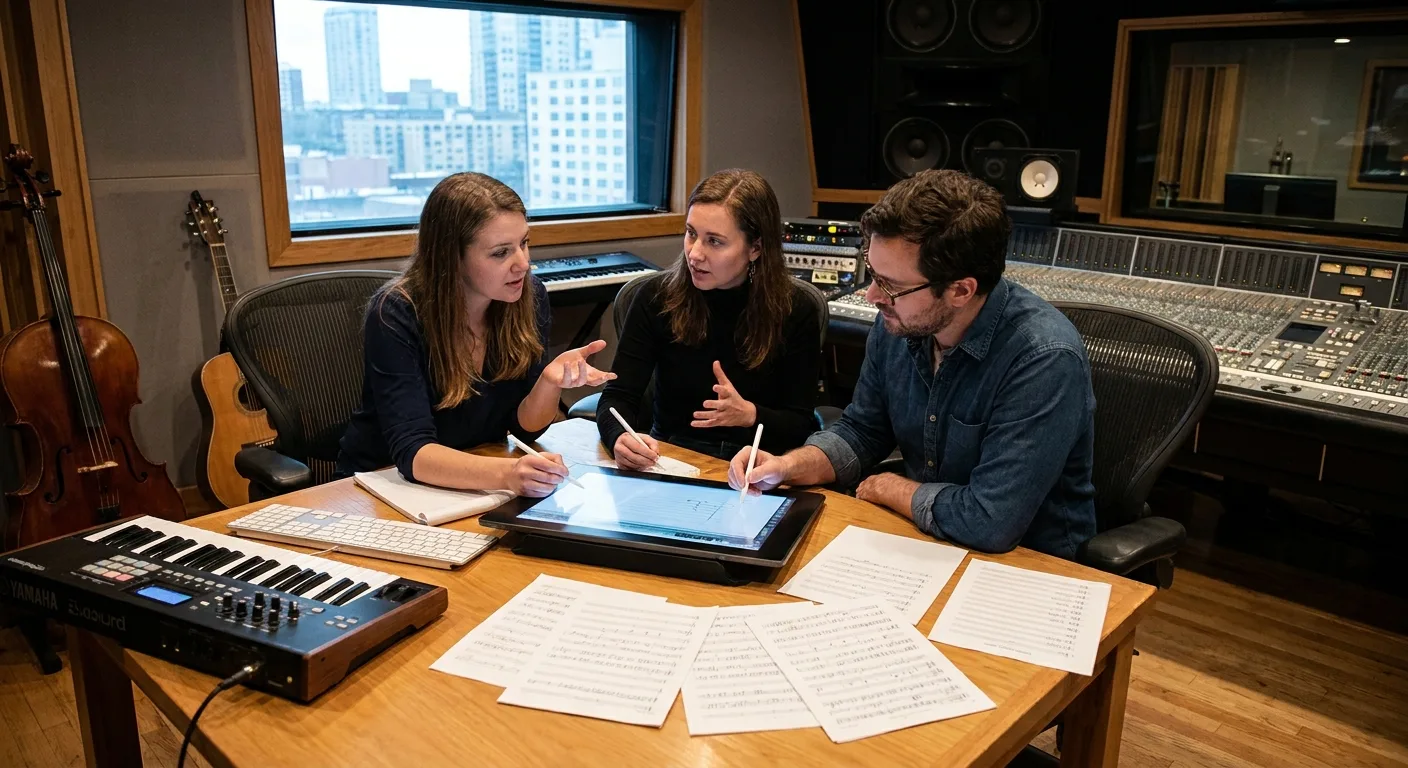
Table of Contents
What is collaboration on digital sheet music?
Collaboration on digital sheet music refers to the sharing, annotation, and synchronization of the same musical repertoire among multiple musicians using their tablets or computers. It replaces paper photocopies and PDFs sent via email with a single, centralized workflow. Each musician sees the same version of a piece, with the same repeats, cuts, and conductor’s cues.
Newzik is a music sheet app based on the concept of a shared library. Developed in France and available on iPad, iPhone, Mac, and the web, it synchronizes documents via the cloud. When a conductor changes a dynamic, the correction is automatically applied to all connected music stands.
The collaboration addresses three specific needs. First, distribution: sending a score or a complete set to a group. Second, shared annotations: fingering, bowing, and breath marks that are visible to everyone. Finally, organization: creating a concert setlist that each musician can access in the correct order.
According to a study published by the Philharmonie de Paris in 2023, the use of tablets for reading sheet music is on the rise among professional orchestras, particularly for managing bowings and turning pages. Newzik supports this trend by offering a detailed augmented format on the augmented sheet music page. This approach reduces version errors and the time spent distributing documents before each rehearsal.
How do you share a sheet music score among several musicians?
To share sheet music among musicians, you can use a shared cloud library or a sharing link that distributes the document and its updates to all recipients. With Newzik, when you organize an ensemble, a shared space is created where you can upload sheet music, accessible to invited members.
There are three methods. Direct sharing sends a file to a specific contact. A shared link allows you to distribute a sheet music file to a large number of musicians without having to add them one by one. The ensemble space brings together an entire group’s repertoire in one place and is continuously updated.
3 formats
Newzik reads PDFs, images, and MusicXML files, allowing users to share engraved, playable sheet music (Newzik documentation, 2025).
The format matters. A shared PDF remains fixed. A shared MusicXML file remains editable: each musician can transpose their part without altering the parts of others. Newzik supports both formats, which facilitates collaboration among musicians who transpose their parts, as detailed in the guide on sharing sheet music for ensembles.
For a group just starting the transition to digital, the first step is to centralize its existing music library. Newzik offers practical advice on its page dedicated to organizing and centralizing a music library. Once the files have been imported, sharing them takes just a few seconds before each session.
Can annotations be shared in real time?
Yes, a sheet music app like Newzik allows musicians to sync their annotations so that a fingering, a cut, or a nuance added by one member appears on the other members’ tablets. This feature eliminates the need to manually copy the conductor’s instructions at the end of each rehearsal.
In practice, synchronization works via the cloud. When a concertmaster draws a bow stroke on their part, the update is sent to the other violins in the section connected to the same space. Newzik’s LiveScores feature displays annotations directly on the playable score, without overwriting the original text.
Key takeaways
- Newzik annotations are overlaid on the sheet music without erasing the original.
- 3 supported formats: PDF, image, and MusicXML.
- A single change made by the conductor is propagated to all connected consoles.
The types of annotations cover all of a musician's needs: fingering, breath marks, dynamic markings, free text, and highlighting. The Newzik blog describes how to work with lyrics, chords, and annotations to prepare a repertoire as a group.
For musicians who work on an iPad with a stylus, the precision of handwritten annotations replicates the feel of writing with a pencil. The complete method is described in the guide to annotating sheet music on an iPad. Sharing then transforms these individual annotations into a collaborative effort.
How does an orchestra collaborate on its sheet music?
An orchestra collaborates on its scores by centralizing the material in a shared library, where the librarian or stage manager distributes the parts, bowing marks, and setlists to each section. Newzik is designed for this workflow, with an ensemble mode that supports large ensembles.
In a symphony orchestra, the number of parts for a single piece often exceeds 60. Distributing paper copies requires hours of photocopying and filing. With Newzik, the librarian imports the score once and then assigns it to the relevant musicians. Each musician receives only their own part.
Sharing bowing patterns illustrates how time is saved. The first violin section leader draws out the bowing patterns and then signals them to the entire section in a single motion. Reading an orchestral score remains challenging: the Newzik blog offers tips for reading an orchestral score.
Newzik details its professional use on the page dedicated to the best app for orchestras. The automatic page-turning feature controlled by a Bluetooth pedal, combined with AudioMatching—which tracks the recording—complements the collaboration tools. The Philharmonie de Paris (2023) notes that the tablet facilitates equipment management in large ensembles. For more information, the article on AudioMatching and the page-turning feature provides details on this functionality.
How does a teacher share sheet music with their students?
A teacher shares sheet music with students through a shared space where they upload pieces, add instructional notes, and track each class’s repertoire. Newzik meets this need in music conservatories and group lessons.
Sharing for instructional purposes differs from sharing in an orchestra. The teacher prepares an annotated piece (fingerings, phrasing, tips) and then sends it to one or more students. The student works with the same instructions as those covered in class. The teacher can update the score between sessions without having to reprint it.
Private Lesson
Sharing an annotated passage with a student, updated between sessions.
Group Class
Distributing the same set of materials to an entire class in a single step.
Conservatory
Centralized directory management by instrumental department.
Newzik offers a service specifically designed formusic education and details its uses on the page for music conservatories. The blog discusses how music teachers can manage group lessons. According to the Ministry of Culture, France had more than 400 accredited music conservatories in 2023, making it a natural setting for these shared uses.
Which tools should you compare when collaborating on sheet music?
To collaborate on sheet music, we compare apps based on cloud sharing, annotation synchronization, supported formats, and ensemble mode. Newzik stands out for its support of replayable MusicXML and an integrated ensemble space, whereas other apps remain focused on PDF.
Cloud-based sharing of a shared folder
- Newzik: Yes, integrated shared space
- PDF-centric applications: Varies, often by file
Synchronizing Annotations
- Newzik: Yes, via the cloud
- PDF-Centric Applications: Limited
Accepted formats
- Newzik: PDF, image, MusicXML
- PDF-focused applications: Primarily PDF and images
Transposition without altering the other parts
- Newzik: Yes, in MusicXML
- PDF-Centric Applications: Rare
Platforms
- Newzik: iPad, iPhone, Mac, web
- PDF-focused apps: Often iPad-only

The choice depends on how you plan to use it. A group that only shares PDFs will be fine with simple apps. A group that wants to transpose, sync, and play back music will need a tool like Newzik. Detailed comparisons are available on the pages “Newzik vs. Piascore” and “Newzik vs. MobileSheets.”
The issue of data protection arises as soon as a folder is shared in the cloud. Newzik outlines its commitments on its page dedicated to data protection. To help you make an informed choice, the French app has been developed by a Paris-based team since 2015.
What Our Customers Say
Newzik has an average rating of 5.0/5 based on 5 verified reviews from professional musicians and teachers.
"An excellent app for sheet music. I'm a professional musician and teacher, and I use it every day. It runs smoothly and offers plenty of options for annotations. And for my lessons, I have my entire library right in my pocket (or almost). I highly recommend it!"
— Franck Paque, professional musician and teacher
★★★★★ 5/5
"PROFESSIONAL! An app that never crashes and does everything you need to work like a pro. Perfect in every way, from music education to live performance. Well done, and thank you to the developers at the Newzik team!"
— Gilles Wilhelm
★★★★★ 5/5
"As a daily user of the French app NEWZIK for reading and annotating sheet music, I highly recommend it: whether for orchestras, chamber music, or educational settings… the app is updated very regularly and always for the better! Long live NEWZIK!"
— David Nicolas
★★★★★ 5/5
"My go-to sheet music app for years! As a professional musician, I’m very satisfied with Newzik’s user-friendliness, features, and stability. As an early adopter, I’ve seen it evolve (always for the better!) and I highly recommend it to all musicians—both professional and amateur—who are looking for the best solution for reading sheet music on a tablet."
— Ez, professional musician
★★★★★ 5/5
"I've been a Newzik user and tester from the very beginning. I've had the pleasure and joy of watching this app evolve and reach levels of perfection I never thought possible. I use it EVERY DAY. The Newzik team is young, dynamic, and very responsive when issues arise. I play guitar in a pop band, using hundreds of sheet music pieces and backing tracks."
— Danimperator Dan, guitarist in a variety band
★★★★★ 5/5
Frequently Asked Questions
How many musicians can share a sheet music file with Newzik?
Newzik lets you share a folder with a section, an entire ensemble, or a class through a shared space. Sharing via a link makes it easy to distribute the folder to a large number of musicians without having to add them one by one.
Are annotations shared automatically?
Yes, Newzik syncs annotations via the cloud. A bowing stroke or a nuance added by one musician appears on the tablets of other members connected to the same space, without the need for manual copying.
Can we collaborate on Newzik without an iPad?
Yes, Newzik works on iPad, iPhone, Mac, and the web. Musicians without an iPad can view and share sheet music from a computer using the online version.
What types of sheet music can be shared?
Newzik supports PDFs, images, and the MusicXML format. MusicXML remains playable and transposable, allowing each musician to adapt their own part without affecting the parts of others.
Can an orchestra manage all of its equipment using a sheet music app?
Yes. Newzik has an ensemble mode designed for large ensembles. The librarian imports the score once, assigns it to the relevant musicians, and sends the bowing instructions to an entire section in a single step.
Can a teacher share annotated sheet music with their students?
Yes. A teacher prepares a piece with fingering and phrasing, then sends it to one or more students. The teacher can update the score between sessions without having to reprint the document.
Is the shared data protected?
Newzik is a French app that details its commitments on its privacy policy page. The shared directory remains securely hosted in the app's cloud.
All resources
Ready to collaborate with other musicians on your sheet music?




.png)
.jpg)
.png)


.png)
Subscribe to our newsletter